
Key Takeaways
- The difficulty of addressing technical SEO issues is that search engines cannot effectively crawl, index, or understand vital pages.
- txt, noindex directives, canonical tag use, redirects, and sitemap issues can negatively influence visibility.
- In addition, site speed, mobile usability, Core Web Vitals, and even dead links can affect performance.
- Regular technical SEO audits help identify problems before they affect organic traffic.
A website can have useful content and still struggle to appear in search results. Technical problems with crawling, indexing, page speed, or URL structure may be the reason.
If you are wondering why your website is not showing up on Google, check these 15 technical SEO problems first.
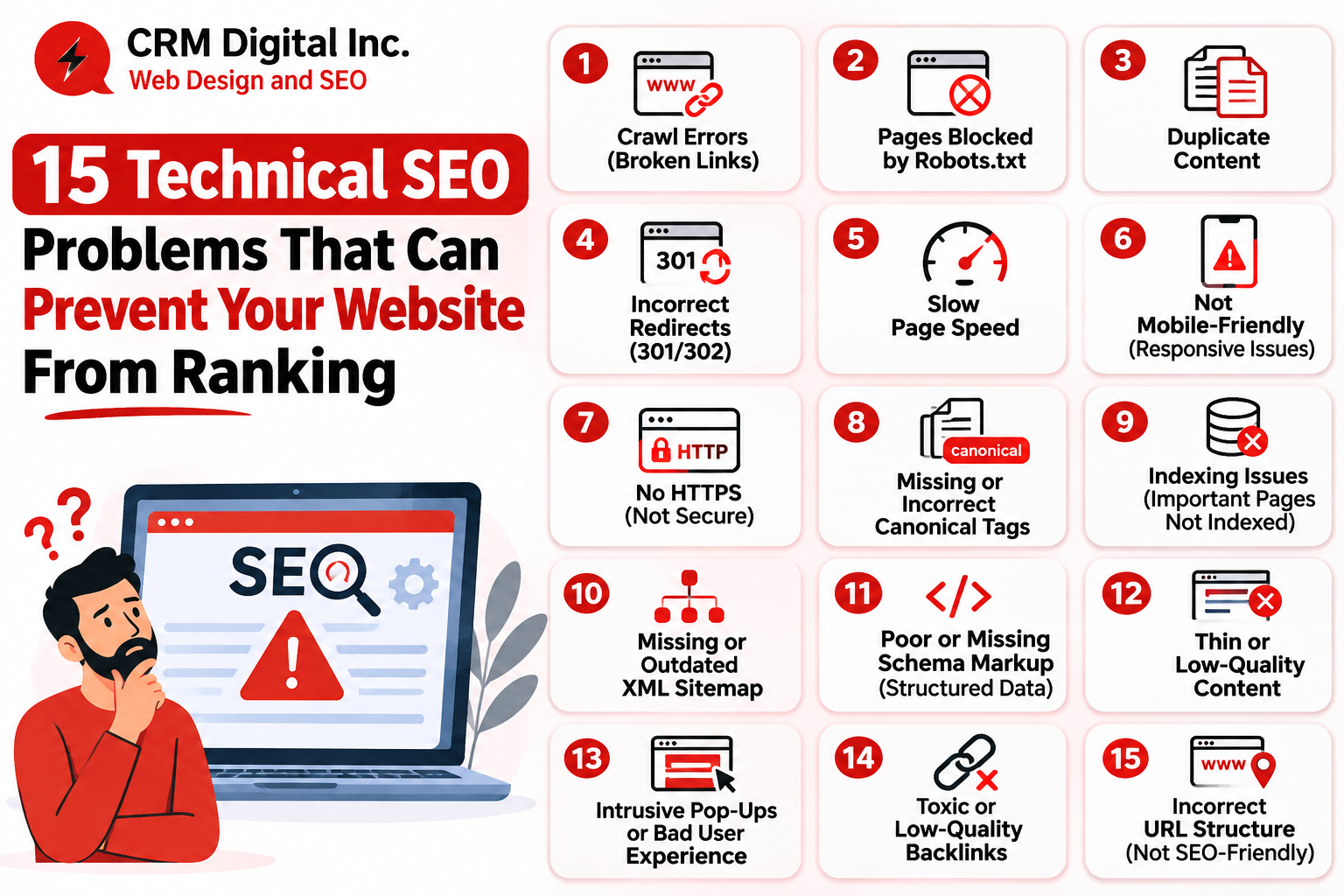
15 Technical SEO Problems to Check
1. Incorrect Robots.txt Rules
Using incorrect rules in a robots.txt file may prevent search engine crawlers from getting access to your important pages. Make sure to check the file for any disallowed areas.
2. Accidental Noindex Tags
When a noindex tag is placed on a web page, it tells search engines not to include this page in their index. Hence, by putting a noindex tag on an important page by mistake, you can remove it from Google Search.
3. Missing or Incorrect XML Sitemap
An XML sitemap assists search engines in discovering important URLs. Hence, it is important to clean the sitemap from broken, redirected, and non-canonical URLs.
4. Incorrect Canonical Tags
Canonicalization SEO helps search engines identify the preferred version of similar pages. A canonical tag pointing to the wrong URL can cause Google to select a different page for indexing.
5. Duplicate Content
Similar pages can be created through filters, tracking parameters, or different URL formats. Use canonical tags and consistent internal links to clarify the preferred version.
6. Broken Internal Links
Broken links can lead users and crawlers to 404 pages. Regularly check internal links and update or remove those pointing to unavailable URLs.
7. Slow Website Speed
Large images, unnecessary scripts, and slow server responses can affect page performance. Compress images, remove unused scripts, and review server response times.
8. Failing Core Web Vitals
Core Web Vitals measure loading performance, responsiveness, and visual stability. Poor LCP, INP, or CLS results can create a weaker page experience. Use Google Search Console and PageSpeed Insights to identify problems.
9. Poor Mobile Usability
Google primarily uses the mobile version of a website for indexing. Missing content, difficult navigation, or poorly sized elements can create mobile usability issues.
10. HTTPS Problems
Mixed content, certificate issues, or incorrect HTTP-to-HTTPS redirects can create technical problems. Make sure important HTTP URLs redirect correctly to their HTTPS versions.
11. Redirect Chains and Loops
Redirect chains send users through multiple URLs, while redirect loops prevent a page from loading. Use direct redirects wherever possible.
12. Incorrect HTTP Status Codes
Important pages need the correct status codes. 404 errors indicate missing pages, while 5xx errors indicate server problems. Check status codes during technical audits.
13. JavaScript Rendering Problems
If important content or links depend on JavaScript that Google cannot properly render, search engines may struggle to understand the page. Test important URLs using Google Search Console.
14. Missing or Invalid Structured Data
Incorrect structured data can prevent eligible pages from receiving rich-result features. Use the appropriate schema and validate it before publishing.
15. Poor Internal Linking and Site Architecture
Important pages should be easy to reach through navigation and internal links. Orphan pages with no internal links can be harder for search engines to discover.
Ready to improve your Website? Schedule a Free Consultation with CRM Digital Inc.
How to Find and Fix SEO Problems
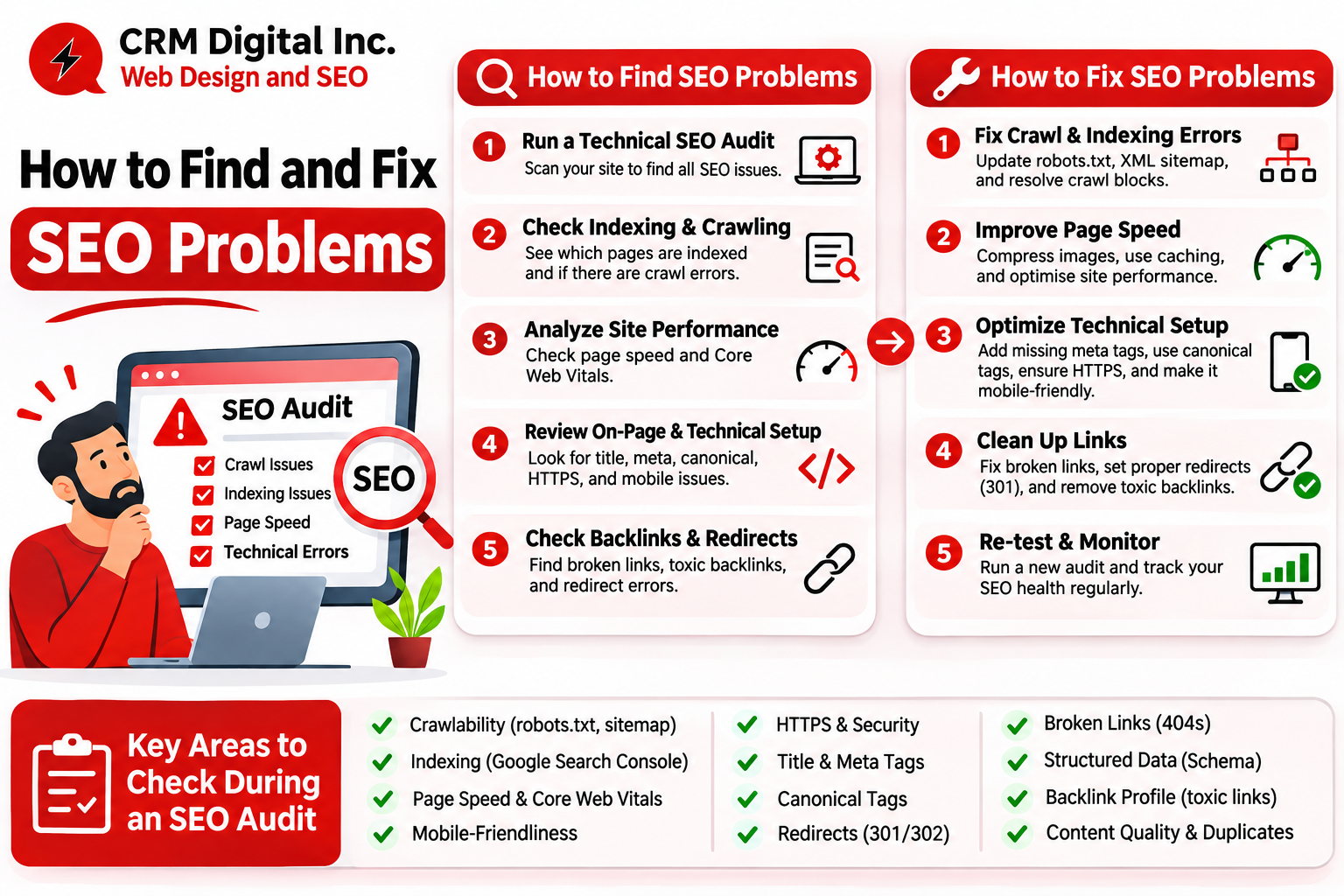
A website crawler can identify broken links, duplicate URLs, redirect chains, and canonical problems. For Google’s guidance on crawling, indexing, and technical requirements, refer to the Google Search Central documentation.
Focus on errors found on landing pages and pages that already bring organic traffic.
Some modifications require adjustments in programming. A web development company will manage the coding challenges and related technical problems, while a professional SEO service provider will help in the process of auditing and monitoring. Businesses that are focused on certain geographical areas must also check their local SEO service needs.
CRM Digital Inc can help businesses identify technical gaps and prioritise fixes based on their impact.
Ready to Rank your Website? Schedule a Free Consultation with CRM Digital Inc.
FAQs
1. Why is Google crawling my website pages but choosing not to index them?
The process of crawling does not ensure that the content gets indexed. Issues like duplicate content, misconfigured canonical tags, signals from the content quality or some other technical concerns can hamper the indexing process. Make sure to check out the indexation report from Google Search Console.
2. Which technical SEO errors harm Google rankings the fastest and require immediate fixes?
Mistakes such as noindex tags being added unintentionally, blocked crawling, wrongly employed canonical tags, server breakdowns and faulty redirects require immediate action. CRM Digital Inc will assist you in sorting out and prioritising these technical SEO issues.
3. How do failing Core Web Vitals directly affect a website’s ability to rank on search engines?
A site with bad core web vitals has trouble with loading speed, responsiveness, and visual stability. Sites with good core web vitals get a better user experience, but passing these metrics does not guarantee a better rank. CRM Digital Inc advises you to check LCP, INP, and CLS regularly.
4. What is the difference between a robots.txt disallow and a noindex meta tag, and when should I use each?
Robots.txt gives instructions about crawler access, while noindex helps search engines understand that the page must not be included in the search results. CRM Digital Inc suggests using each directive according to its purpose and avoiding them on ranking pages.
5. How often should you run a technical SEO audit to catch hidden crawl errors before traffic drops?
A full technical SEO audit every quarter is a practical starting point. Google Search Console should be monitored more frequently, especially after major website changes. CRM Digital Inc recommends regular monitoring to catch new SEO problems early.