You may already track rankings, clicks, and organic traffic. But that leaves another important question unanswered: Is your website appearing when Google generates an AI-powered response?
In 2026, Google introduced dedicated generative AI performance reporting in Search Console, giving website owners a clearer view of impressions generated when their pages appear in Google AI Overviews and AI Mode.
Find Your AI Search Visibility in Google Search Console
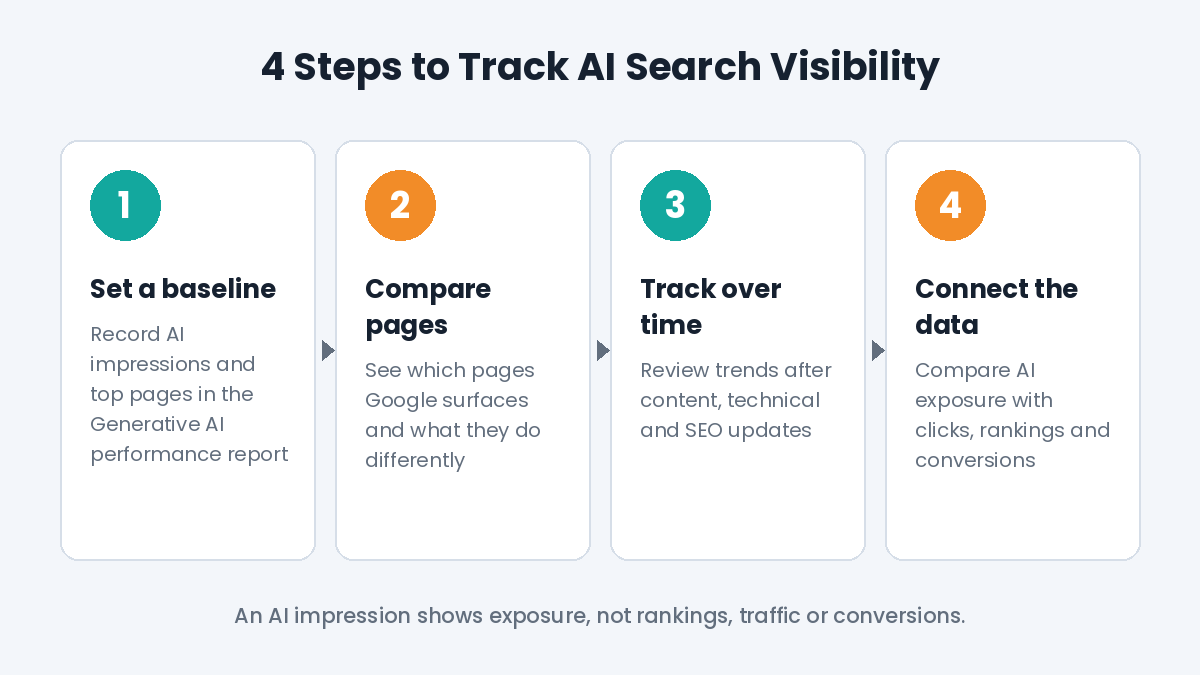
Start with the Generative AI performance report in Search Console. It provides a focused view of impressions generated when links from your website appear in AI Overviews or AI Mode. Record your current impression total and the pages receiving the most visibility so you have a baseline for future comparisons.
The report currently focuses on impressions, with data available by page, country, device, and date. An AI impression confirms exposure within a generative search experience, but it should not be interpreted as evidence of higher rankings, increased traffic, or additional conversions.
Look at the Pages Google Is Already Surfacing
Page-level data can show where your AI visibility is coming from. If certain informational pages consistently receive impressions while similar content does not, compare them to identify meaningful differences.
Look at whether stronger pages answer questions clearly, cover the subject in sufficient depth, use descriptive headings, provide relevant context, and connect naturally with related content.
Use these differences to decide what deserves testing next rather than assuming you have found an “AI ranking factor.” When stronger pages share similar patterns, use those findings to prioritize which weaker pages need attention, while remembering that impression data alone cannot prove that one specific change caused greater visibility.
Track AI Visibility Over Time
A snapshot only tells you where your website stands at that moment. Tracking impressions over time can show whether its presence in Google AI Overviews and AI Mode is expanding, declining, or remaining relatively stable.
Set a baseline and review changes after significant content updates, technical improvements, or SEO work. If your business depends on customers from specific markets or receives significant search activity from mobile users, country and device data can show where that AI exposure is happening.
Connect AI Visibility With Your Wider SEO Performance
AI search data becomes more useful when viewed alongside organic impressions, clicks, landing-page performance, rankings, and conversions. This comparison can show whether pages gaining AI exposure are also contributing to broader search performance.
The goal is not simply to collect another metric. Use the data to understand where your website is appearing, identify patterns in the pages earning exposure, and decide where your SEO efforts should focus next.
If your Search Console data shows opportunities in AI search, CRM Digital Inc. can help determine which pages need attention and turn those findings into focused SEO and AEO improvements. Contact us to strengthen your website’s visibility across traditional and AI-powered search.
Frequently Asked Questions
Where can I see whether my website appears in Google AI Overviews?
Google Search Console’s Generative AI performance report shows impressions generated when links from your website appear in AI Overviews or AI Mode. You can review that data by page, country, device, and date to understand where your AI search visibility is coming from.
Does an AI Overview impression mean my website received more traffic?
Not necessarily. An AI impression confirms your page was shown within a generative search experience, but it does not prove higher rankings, more clicks, or additional conversions. Review AI impressions alongside organic clicks, landing-page performance, and conversions to get a complete picture.
How often should I review my AI search visibility?
Set a baseline first, then review the data regularly and after significant content updates, technical improvements, or SEO work. Tracking impressions over time shows whether your presence in AI Overviews and AI Mode is growing, declining, or holding steady, which a single snapshot cannot reveal.